Versiona CuboPlus

Your Qlik script history, in your Git.

Versiona stores every change to the load script in your company's GitLab or GitHub, with a comment from whoever made it. You can see what changed, who changed it and why, and go back to an earlier version, without leaving Qlik Sense®.

For Qlik Sense Client-Managed and Qlik Cloud Analytics, with GitLab or GitHub. Free.
The Versiona CuboPlus mascot

How it works

Three steps, and none of them installs anything on the Qlik server.

1

Install it as an extension

An extension for Chrome and Edge. You open Qlik, click the icon and enter the Git repository that will store the scripts. The Qlik address comes from the tab itself.

2

Connect it to your Git

With your GitLab or GitHub account, without creating or pasting a token: the administrator registers the app once. Every version goes out with your name as the author, like any commit.

3

Say what changed

The mascot notices that the script changed and asks why. You write one line, and the version is stored, with the diff and the history at hand.

See it working

Versiona in use, from the changed script to the version stored in Git.

The video is on YouTube and is only loaded when you tap it. Open on YouTube.

On screen

Versiona in a sample app. Click a screenshot to enlarge it, and use the arrow keys to move from one to the next.
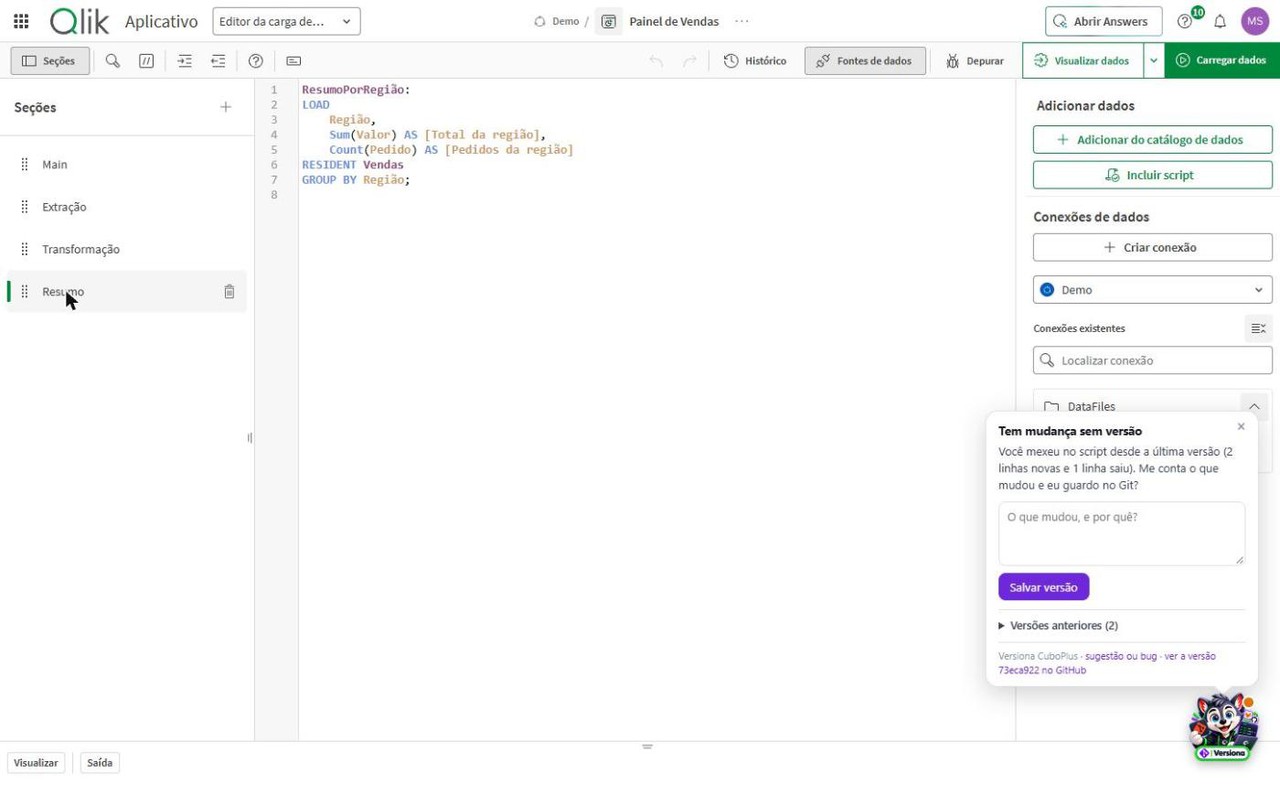
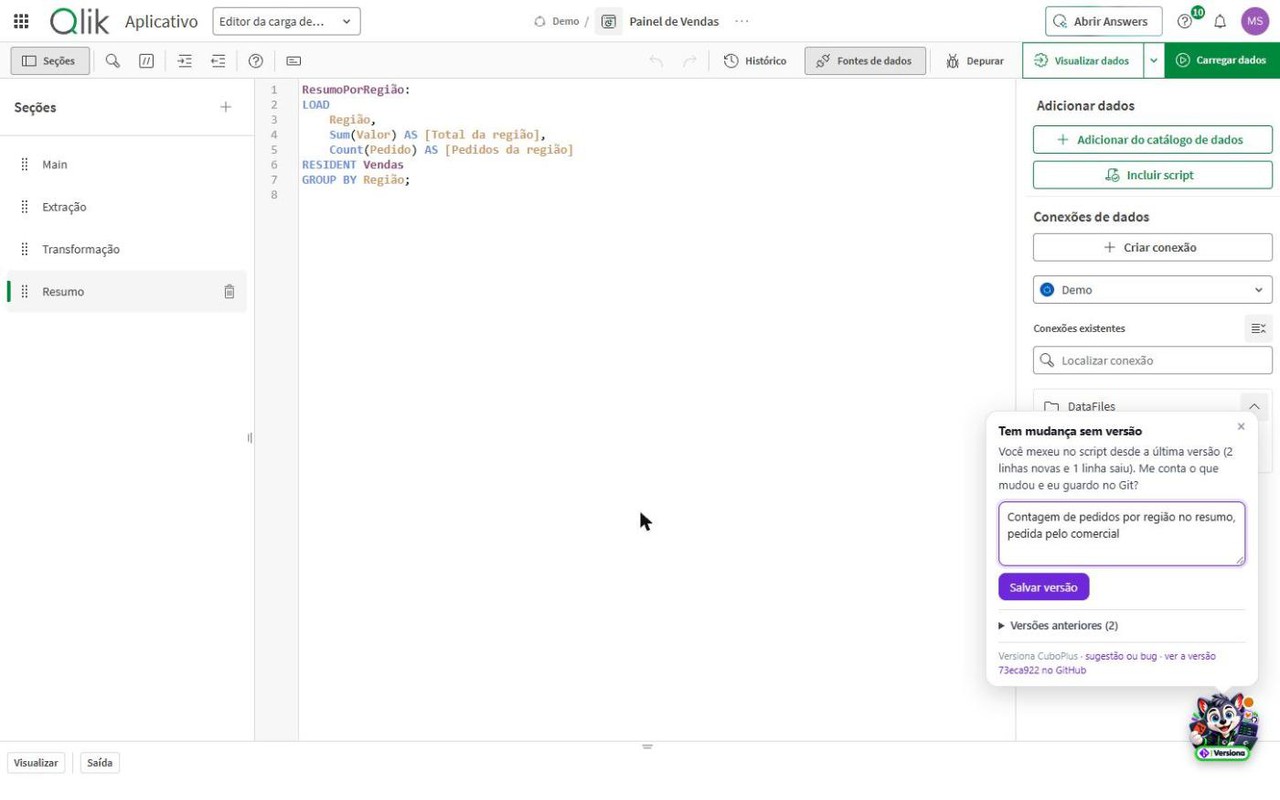
Qlik script editor with the Versiona mascot's speech bubble saying there is an unversioned change and asking for a comment
The mascot lets you know The script changed and is not versioned yet: Versiona asks what changed, right there in the Qlik editor.
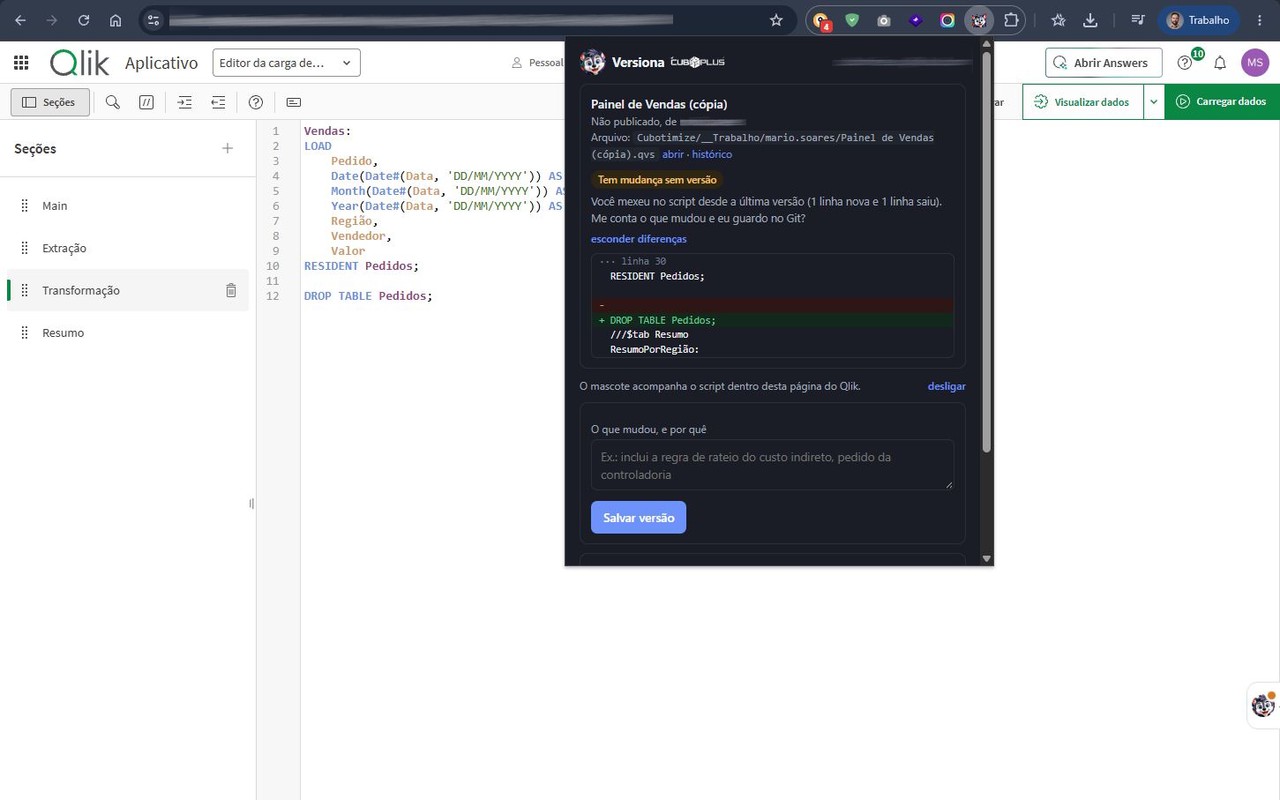
Versiona popup showing the script differences, with new lines in green and removed lines in red
What changed, line by line Before you save, the lines added and the lines removed since the last version.
Versiona popup with the comment field filled in and the save version button
Save with a comment The comment becomes the commit message, with your name as the author.
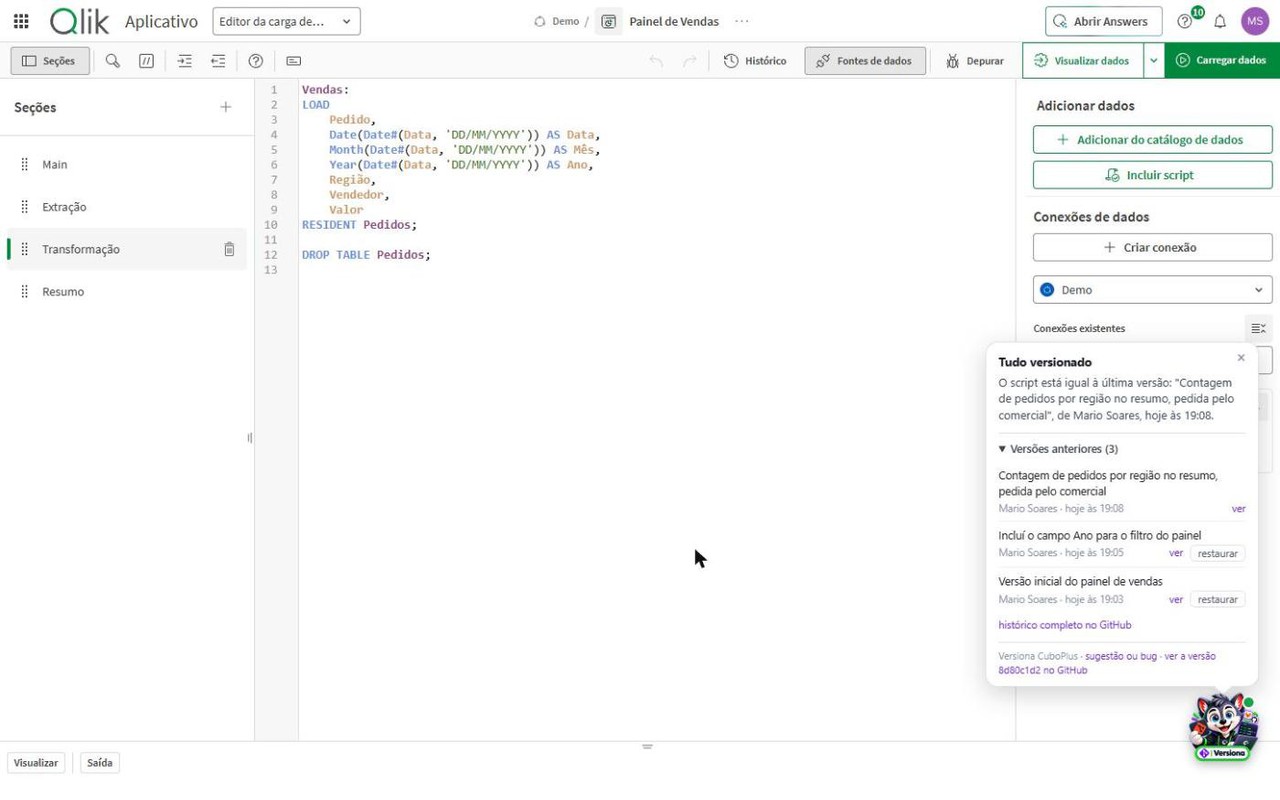
List of an app's earlier versions, each with author, date and comment
The app's history Who changed it, when and why, with the link to the version on GitLab or GitHub.
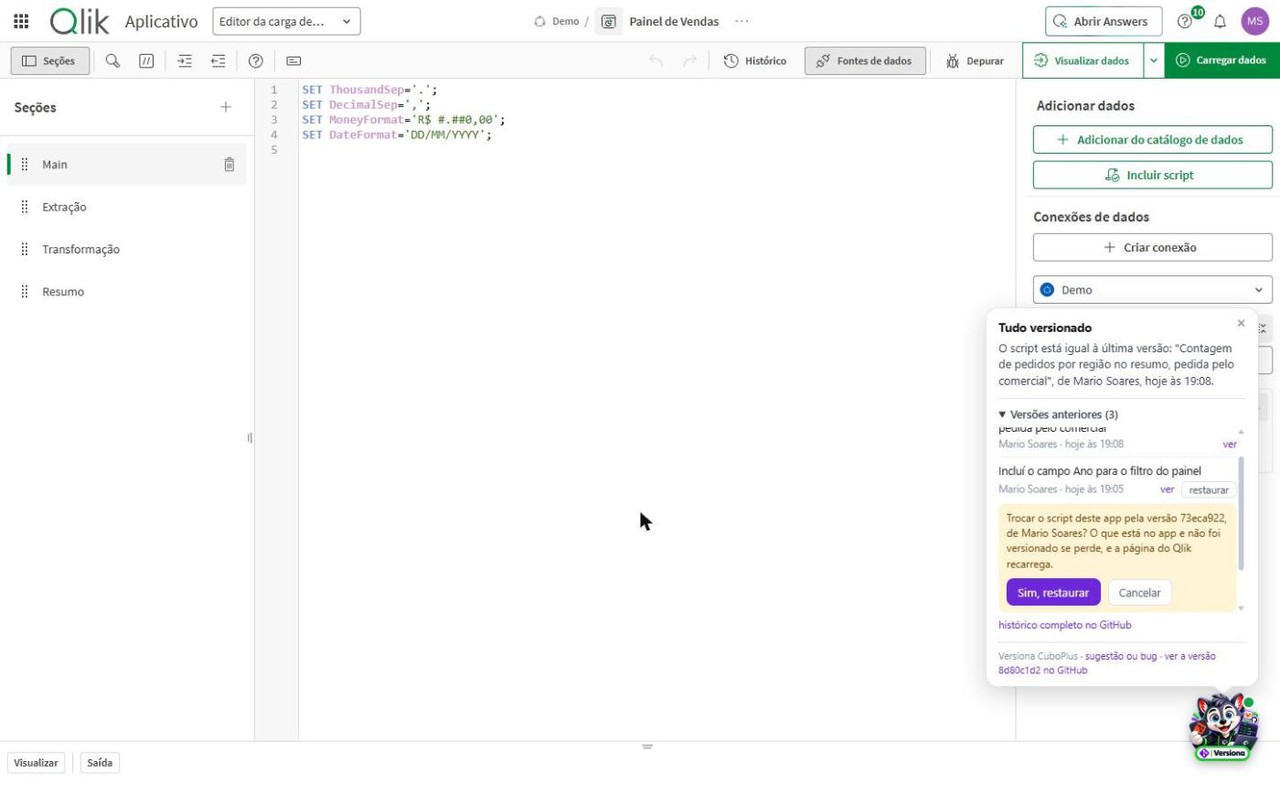
Confirmation to restore an earlier version of the script
Restore a version With confirmation: the app's script goes back to that version, with the sections in place.
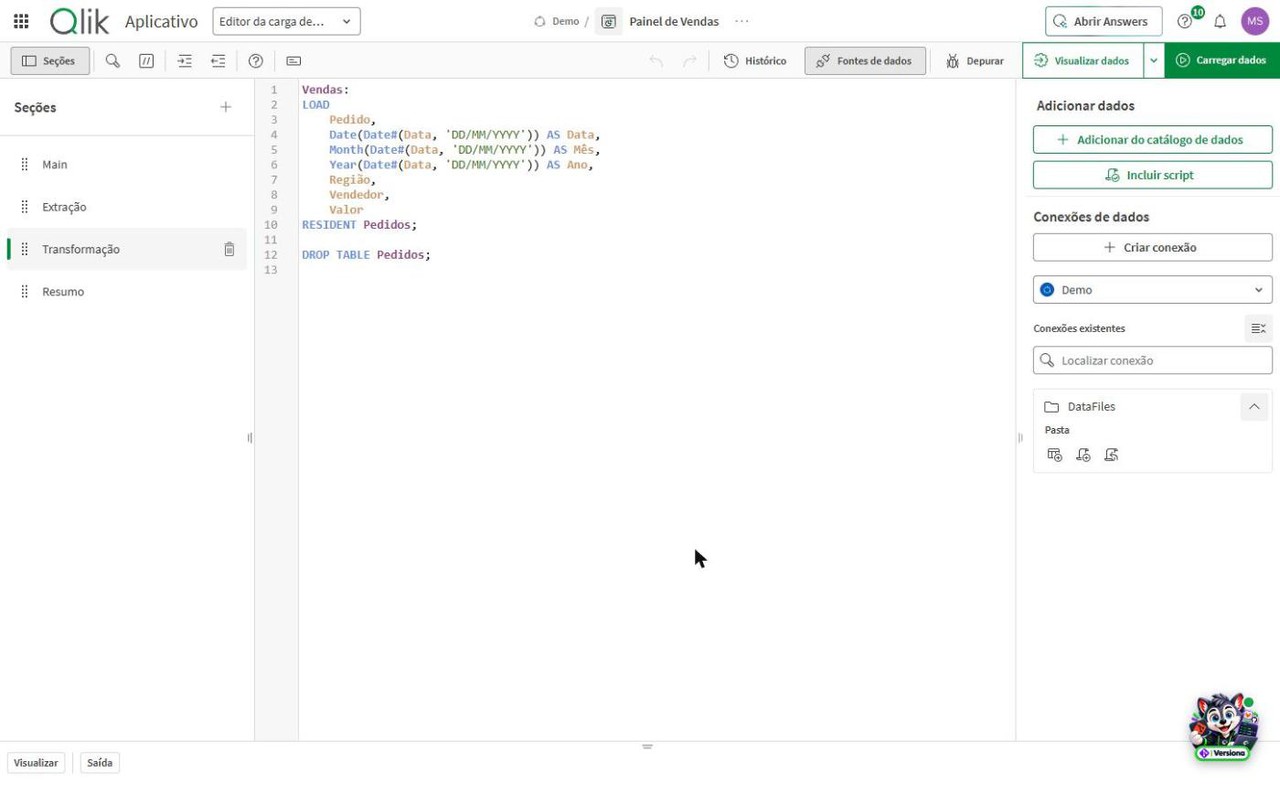
Versiona mascot collapsed in the corner of the Qlik screen, with the green dot
Everything versioned The green dot on the mascot says the script matches the last version.
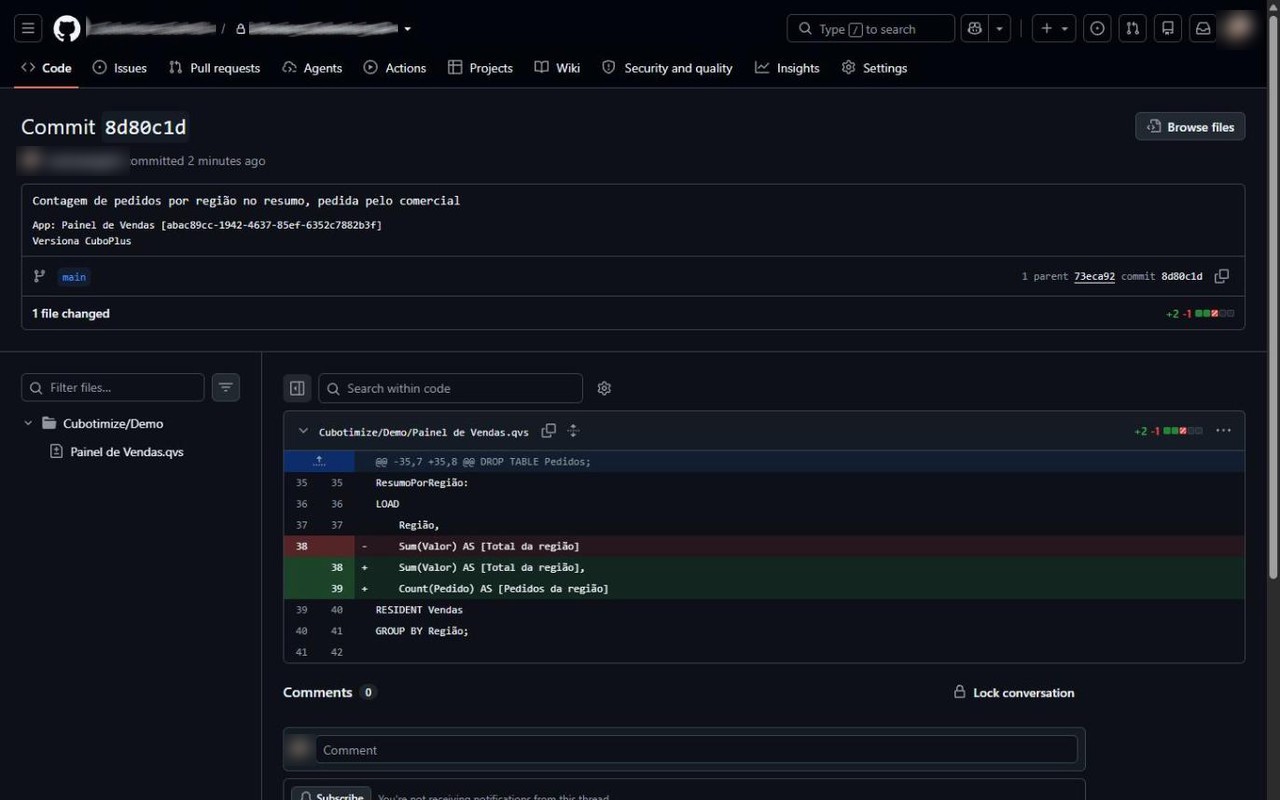
Repository page on GitHub with the commit made by Versiona and the stream folder
In your Git Every version is a commit in your company's repository, in one folder per stream or space.
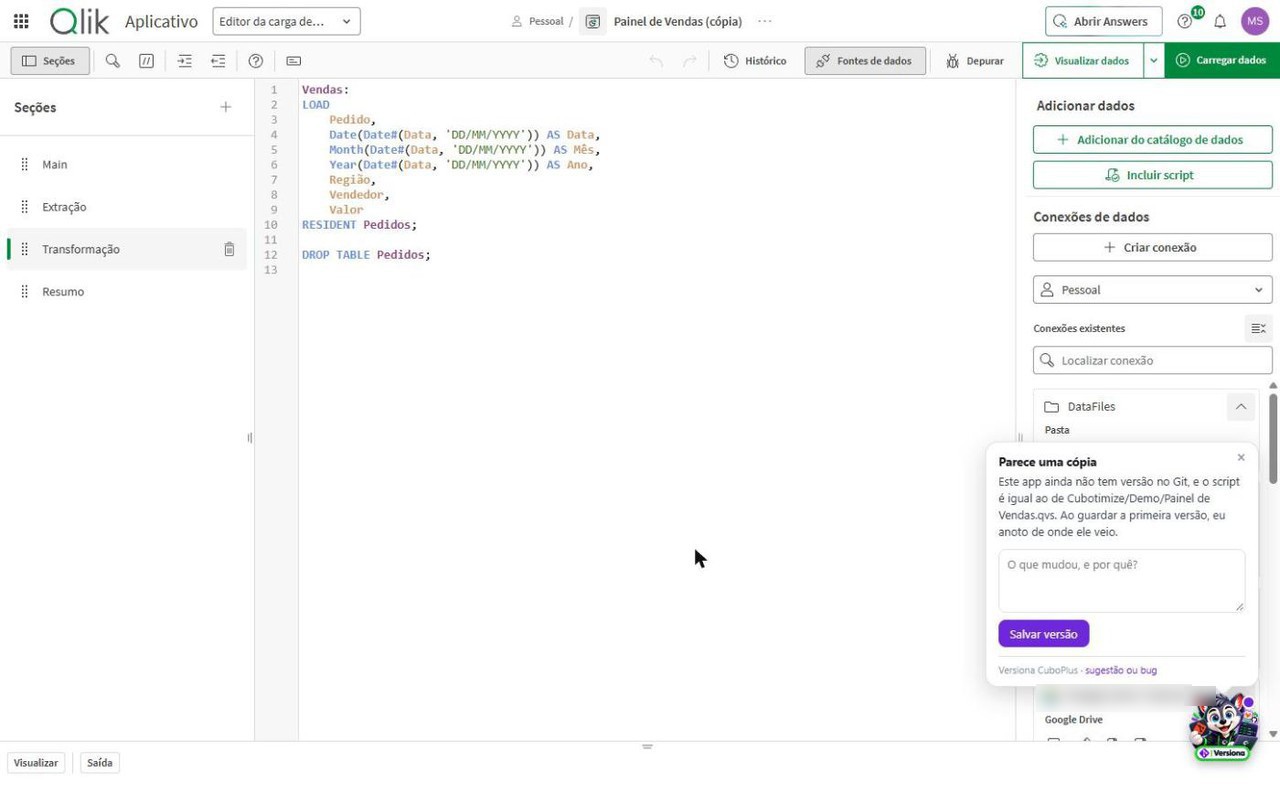
Mascot speech bubble saying the app looks like a copy and pointing to the source file
Copy and publish Copied an app? Versiona records where it came from, and when you publish over the original it brings the copy's versions into the history.
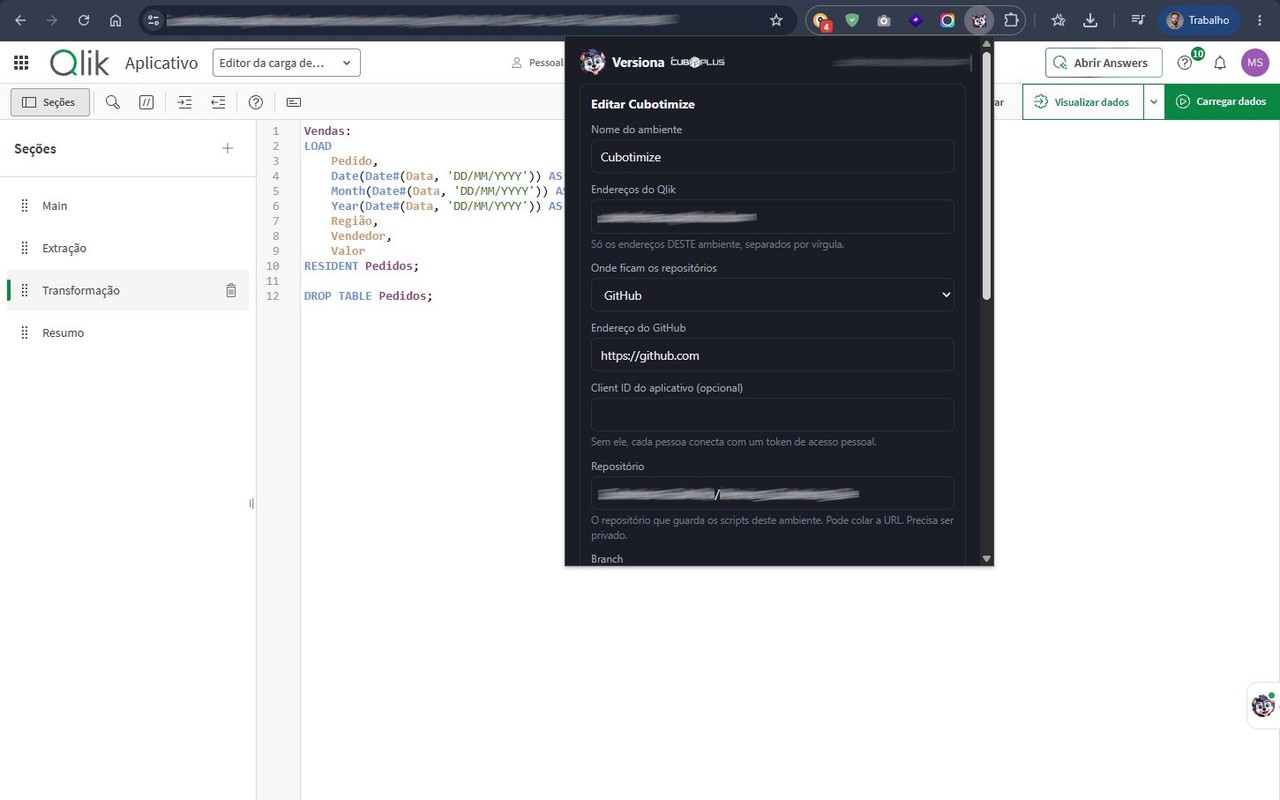
Server form in the Versiona popup, with the environment name, the Git provider and the repository
Set up in one minute The Qlik address comes from the open tab. You choose GitLab or GitHub and enter the private repository.
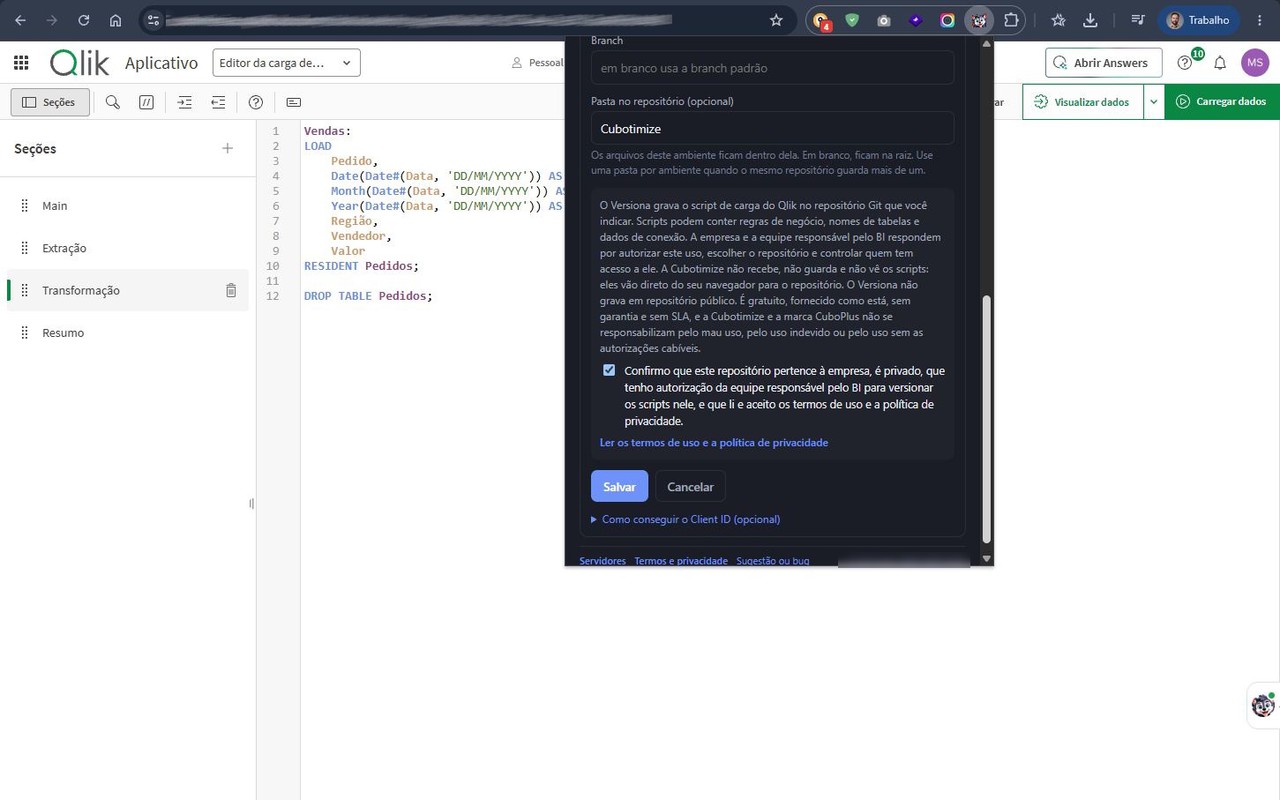
Second part of the server form, with the folder in the repository and the confirmation of the statement of responsibility
Responsibility in plain sight The environment's folder in the repository and the statement of responsibility, confirmed before saving.
Qlik Sense client-managed script editor with the Versiona speech bubble saying the script was versioned by the routine, and the Autosync versions
On client-managed Qlik too On Qlik Sense installed at the company, with GitLab: the mascot shows what the nightly routine stored without a comment and invites you to explain.

What it does

For developers and for whoever is accountable for BI.

For developers

A version stored without leaving the editor

  • The mascot, inside Qlik, tells you whether the script is versioned or has changed and still needs to be stored.
  • The differences line by line, before you save.
  • The app's history, with author, date and comment, and the link to the version in Git.
  • Restore an earlier version, with confirmation, keeping the script sections.
  • Optional: the expressions of master measures and dimensions and the app variables, in a file next to the script and in the same version. Read-only: Versiona does not change these items in Qlik.
  • Copied an app to work on it? Versiona records where it came from. Published over the original? The copy's versions join the history of the published app.
For whoever is accountable for BI

Who changed it, when and why

  • One file per app, in one folder per stream or per space, in the company's repository.
  • Every version with the real author: the login of the person who made the change, not a service user.
  • Works with the Git the company already has: self-hosted GitLab or GitHub.
  • One repository can hold several environments, each in its own folder.
  • A statement of responsibility confirmed per server: it is on record that the use was authorized.
  • Optional, on client-managed Qlik: a nightly routine in PowerShell stores overnight whatever changed without going through the extension. The script and the installation guide are open.

What it does not do

The load script holds business rules and, sometimes, connection details. Versiona was designed around that.

It does not go through any server of ours

The script goes from your browser straight to Qlik and to your company's Git. Cubotimize does not receive, store or see scripts or credentials. There is no telemetry and no usage analytics.

It does not write to a public repository

The extension checks the repository's visibility and refuses to write when anyone on the internet could read it. If it cannot check, it does not write either.

It does not touch the app unless you ask

Reading the script changes nothing. The only write to Qlik is the restore, requested and confirmed by you. And the extension only sees the addresses you allow.

Highly recommended

It does not leave the token exposed

There are two layers. The first is always on: the Git token is encrypted in the browser. The second is yours to turn on: with Windows Hello, the token only opens after your PIN or biometrics. It is with this second layer that a profile copied to another computer cannot open the token. How to turn it on.

Versiona versions the load script and, with the option turned on for the server, the expressions of master items and the app variables. These items are read-only: they go to Git, but are not written back to Qlik on restore. Sheets, charts and data are not included. In Qlik Cloud, development happens in the shared space: that is where you version the app that is later published to the managed space.

About us

Versiona was born from Qlik consulting, not from a drawing board.

Cubotimize Soluções em Inteligência Tecnológica LTDA is a Brazilian company that has worked with data intelligence, Business Intelligence and software development since 2016, specializing in Qlik®. Visit our website at cubotimize.com.

CuboPlus is the company's ecosystem of in-house products. Versiona came from a problem we kept seeing at clients: the script changed, the dashboard started showing a different number, and nobody could say who had touched it or why. A nightly copy stores what changed; only the person who changed it knows the reason.

It is free, and provided as is, with no warranty and no SLA. Suggestions and problem reports are welcome by email.

Other products

Lupa CuboPlus

Questions in Portuguese about your Qlik Sense® Client-Managed data, inside Qlik itself. lupa.cubo.plus

Trilha CuboPlus

A corporate LMS that turns technical documents, PDFs and videos into a gamified learning path, with quizzes generated on the spot. trilha.cubo.plus

Link CuboPlus

Smart link shortening, custom vector QR Codes, CTAs and a bio page, with engagement analytics. link.cubo.plus

Sorteio CuboPlus

Your definitive platform for raffles and games (bingo, roulette, 3D dice, Instagram), fully lightweight, interactive and free. Works offline. sorteio.cubo.plus

Qlik consulting and custom projects: cubotimize.com

Install it and start versioning today

Install it from the Chrome Web Store, open your Qlik and click the Versiona icon. For questions, suggestions or problems, write to us.

It is free. If it helps your work, the way to say thanks is to follow CuboPlus: